
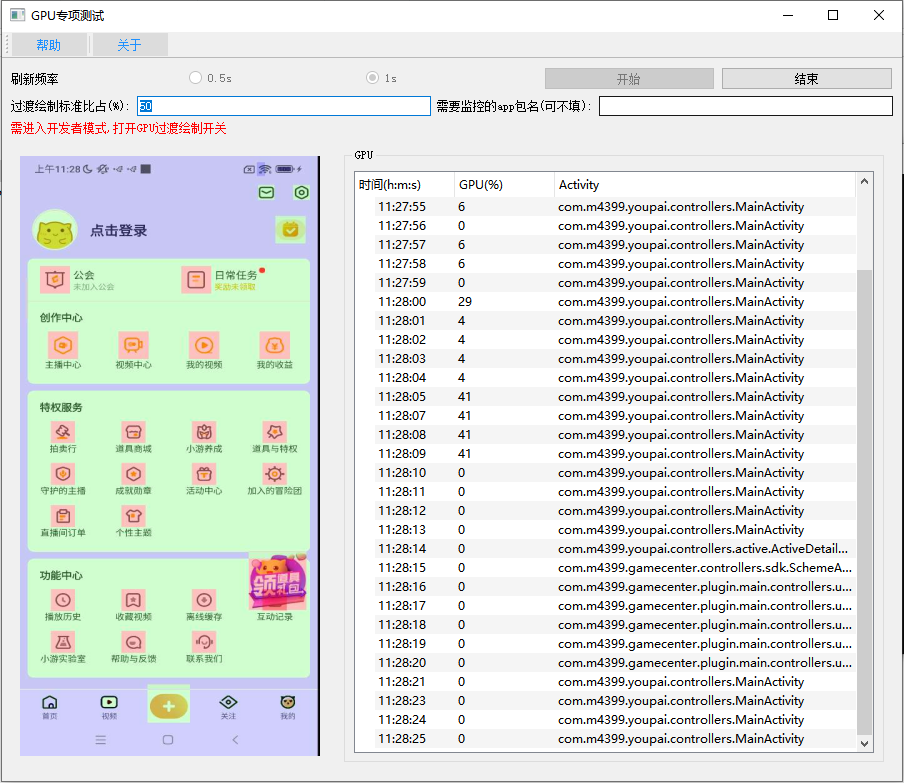
Tool Introduction
The GPU Overdraw Test Tool builds a device screen-capture path through ADB or HDC, saves the current frame locally, and calls the bundled DLL to calculate the ratio of specific color regions as the GPU overdraw percentage. The UI supports 0.5s/1s refresh, threshold configuration, optional package filtering, live image preview, and Activity recording; when the percentage reaches the threshold, the tool saves a screenshot to the overdraw directory. It depends on the device-side GPU overdraw developer option, is not a low-level GPU profiler, and does not implement root-cause performance diagnosis.
Key Features
Calls a DLL on local screenshots to calculate color ratio and display overdraw as a percentage.
Captures the current device frame and records foreground Activity, with optional package-based filtering.
Automatically copies screenshots to the overdraw directory when the configured threshold is reached.
Testing Scenes
- Observe overdraw percentage during page walkthroughs to find screens with higher rendering load.
- Monitor foreground pages for a specified package at 0.5s or 1s refresh intervals.
- Set an overdraw threshold and automatically save screenshots that meet or exceed it to the overdraw directory.
- View live device imagery, GPU overdraw percentage, and current Activity together.
Environment & Requirements
- Platform
- Windows desktop; test targets include Android devices connected through ADB and HarmonyOS/OpenHarmony-style devices connected through HDC.
- System Range
- Android capture uses ADB and a scrcpy server path; HDC capture uses a harmonyscrcpy/uitest path. The code includes Android API and ABI detection, but no explicit supported OS version range is declared.
- Access Path
- Started from a PyQt5 GUI; users can set refresh frequency, overdraw threshold, and optionally provide a target app package name.
- Package
- GpuTool.rar
Permissions & Dependencies
- The PC side requires Python/PyQt5, adb or hdc, bundled scrcpy/harmonyscrcpy resources, and the image-analysis DLLs under lib/dll.
- Android devices must allow ADB debugging, file push, port forwarding, and starting the app_process scrcpy service.
- HDC devices must allow hdc file send, fport, uitest start-daemon, and related shell commands.
- The test device must enter developer mode and enable the GPU overdraw display option.
Support Notes
Explicitly Supported
- package.py explicitly supports the gpu packaging entry, mapped to GPUGui.py.
- GPUGui.py requires developer mode and the GPU overdraw display option.
- GPUGui.py supports 0.5s and 1s refresh intervals, an overdraw threshold, optional package filtering, and live image display.
- The Android path uses support.scrcpy, while the HDC path uses support.harmonyscrcpy.
- overdraw() calls dll.GetRColorRatio on ./tmp/placeholder.jpg to calculate color ratio.
- When the threshold is reached, screenshots are copied to ./overdraw/.
Reasonable Inference
- The overdraw percentage depends on the color rendering produced by the device's GPU overdraw display option.
- The capture path depends on scrcpy/harmonyscrcpy services and port forwarding, which may be affected by device policy.
- Uses live screenshots and color-ratio analysis to present overdraw percentage, directly tied to the device developer-option overdraw visualization.
- Supports both Android ADB/scrcpy and HDC/harmonyscrcpy capture paths.
- Screenshots above the threshold are retained automatically for later review of the exact page state.
Download & Trust
- Package
- RAR
- Size
- 83.0 MB
- Updated
- 2026-05-22
- Download
- Sign in Required
This self-developed tool is built for real Android app QA workflows, runs locally, and does not depend on an external testing platform.