
Tool Introduction
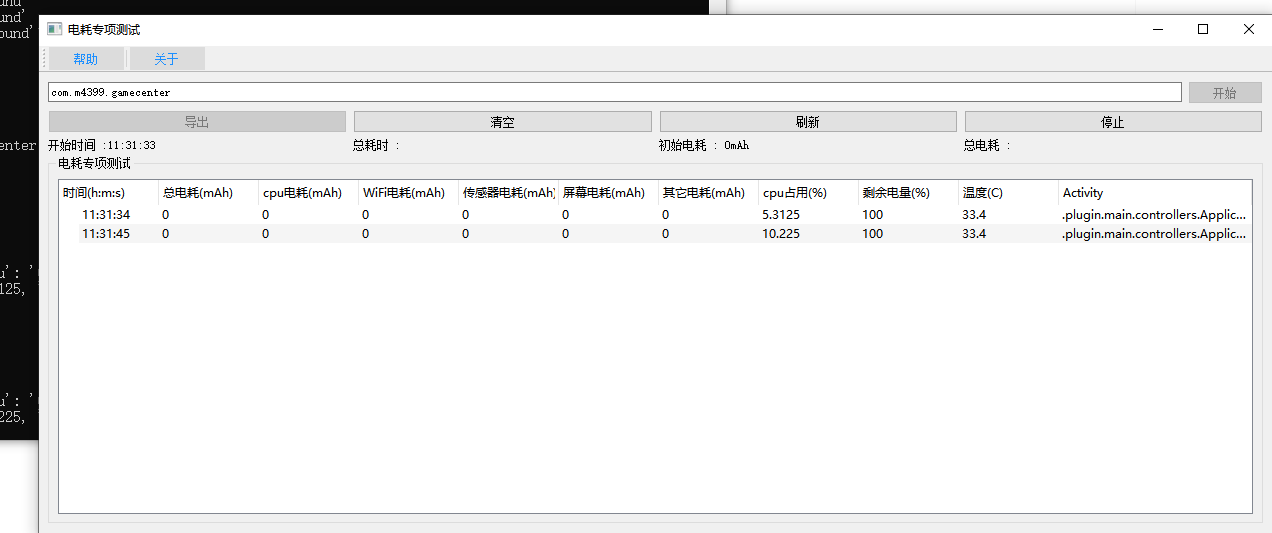
The Battery Consumption Test Tool is built for Android app power testing workflows. After startup, it resets batterystats and reads the consumption attribution data for the app UID by package name, while also collecting battery level, temperature, CPU usage, and current Activity. The UI displays total consumption and CPU, Wi-Fi, sensor, and other categories, calculates the session total after stopping, and supports xls export. The tool depends on Android batterystats output, does not implement HDC/HarmonyOS collection, and does not provide automated test orchestration.
Key Features
Parses total usage and CPU, Wi-Fi, sensor, and related categories by UID through dumpsys batterystats.
Displays battery level, temperature, CPU usage, and Activity together to connect power changes with test actions.
Tracks the difference between initial and final consumption and exports -battery.xls files.
Testing Scenes
- Observe battery consumption during a specific app workflow and record changes in total and categorized usage.
- Inspect the breakdown of CPU, Wi-Fi, sensor, and other power consumption for an app.
- Record battery level, temperature, CPU usage, and current Activity together to help locate high-consumption scenarios.
- Export test data to an xls file as an attachment for battery-focused testing.
Environment & Requirements
- Platform
- Windows desktop; test targets are Android devices connected through ADB.
- System Range
- The code reads Android API level through ro.build.version.sdk and uses dumpsys batterystats, dumpsys battery, top, and related commands; no explicit minimum or maximum Android version is declared.
- Access Path
- Users enter the app package name in a PyQt5 GUI to start sampling; the device serial is obtained automatically from adb devices.
- Package
- battery.exe
Permissions & Dependencies
- The PC side requires Python/PyQt5, tablib, and a usable adb command-line tool.
- The device must enable USB debugging or ADB over network and allow shell commands such as dumpsys, top, and ps.
- Sampling starts by running dumpsys batterystats --reset.
- The package name must match a running process and UID.
Support Notes
Explicitly Supported
- package.py explicitly supports the battery packaging entry, mapped to batteryGui.py.
- batteryGui.py displays total consumption, CPU consumption, Wi-Fi consumption, sensor consumption, other consumption, CPU usage, battery level, temperature, and Activity.
- The Worker calls resetBattery at startup, which runs dumpsys batterystats --reset.
- adb_command.py uses dumpsys batterystats, dumpsys battery, top, ps, and dumpsys activity.
- Exported files use the -battery.xls suffix.
Reasonable Inference
- The tool is best suited to single-device Android battery testing because the UI does not provide a manual serial input.
- batterystats fields may vary across Android versions or vendor builds.
- Uses Android batterystats as the core data source and reads system-side power attribution results directly.
- Uses a fixed table covering total power, categorized power, battery level, temperature, CPU usage, and current page.
- Calculates total consumption for the session after stopping and exports the test record.
Download & Trust
- Package
- EXE
- Size
- 50.5 MB
- Updated
- 2026-06-02
- Download
- Sign in Required
This self-developed tool is built for real Android app QA workflows, runs locally, and does not depend on an external testing platform.