
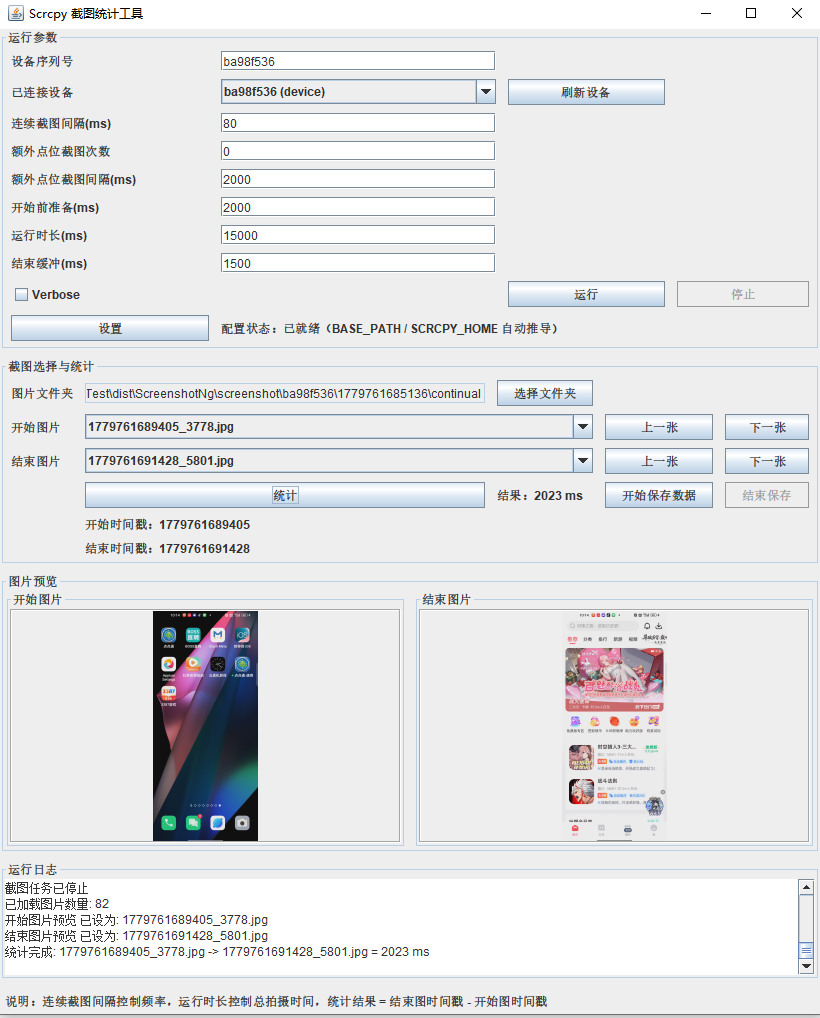
Tool Introduction
ScreenshotNg is a Windows desktop testing utility built around a customized scrcpy and adb workflow. It reads Android SDK configuration, scans connected devices, saves screenshots under a local screenshot directory by device serial and run timestamp, and calculates elapsed time from millisecond timestamps in image filenames. The code explicitly implements continuous capture, extra point-shot capture, a lower-bound check for continuous capture intervals, run duration and end-buffer settings, automatic device refresh, image folder selection, bad-image filtering, thumbnail preview, enlarged browsing, keyboard navigation, timing display, CSV save sessions, and Windows app-image packaging. CSV files are stored under screenshot/summary, named with the time when data saving starts, and written with a UTF-8 BOM for easier Excel opening. Its data sources are local adb/scrcpy output, local screenshot files, and user-selected start/end images; the code does not explicitly implement automated business anomaly detection, cloud access, multi-user collaboration, or cross-platform desktop runtime support.
Key Features
Each run creates an isolated folder by device serial and run timestamp, with a default 80 ms continuous capture interval and a required interval above 40 ms when continuous capture is enabled.
Supports image selection, previous/next navigation, thumbnail preview, enlarged viewing, and elapsed-time calculation from millisecond timestamps in start/end image filenames.
A save session controlled by Start Saving Data and Stop Saving appends multiple timing results to one timestamp-named CSV file.
Testing Scenes
- Capture a traceable screenshot timeline from an Android workflow at a fixed millisecond interval, stored in an isolated folder for each run.
- Select a start frame and an end frame from a screenshot sequence to calculate timing for transitions, animations, or operation completion.
- Persist multiple timing measurements during one test session into a timestamp-named CSV summary file.
- Use thumbnails, enlarged preview, and previous/next navigation to help testers manually locate key frames.
- Package the tool as a double-clickable Windows app-image for local test teams.
Environment & Requirements
- Platform
- Windows desktop environment; the target device is an Android device reachable through adb.
- System Range
- The code does not explicitly restrict the Windows or Android OS version. Repackaging from source requires JDK 21 or a compatible version; the packaged Windows app-image includes a Java runtime. Path resolution uses URI-based handling for installation directories that contain Chinese characters or spaces.
- Access Path
- Primarily launched as a Windows GUI executable, with a Java command-line entry point that accepts a device serial and capture interval.
- Package
- ScreenshotNg.rar
Permissions & Dependencies
- The Android device must have USB debugging enabled and be authorized for adb.
- Accessible adb is required; the application first tries the adb bundled with scrcpy-win64 and also checks the Android SDK path.
- A valid Android SDK path is required; the application reads ANROID_SDK_ROOT, ANDROID_SDK_ROOT, or ANDROID_HOME.
- The project or packaged application directory must include scrcpy-win64 with the scrcpy executable and scrcpy-server.
- Local write permission is required for the screenshot output directory under the application root, including screenshot folders and the screenshot/summary result directory.
- Repackaging requires javac, jar, and jpackage.
Support Notes
Explicitly Supported
- The code explicitly implements a Swing GUI, Java command-line entry point, adb devices listing, and device serial selection.
- The code explicitly implements capture interval, extra point-shot count, extra point-shot interval, startup preparation, run duration, and end-buffer parameters; the GUI default continuous capture interval is 80 ms, and enabled continuous capture requires an interval above 40 ms.
- The code explicitly writes screenshots to screenshot/<device-serial>/<run-timestamp>/ under the application root and prefers screenshot/<device-serial>/<run-timestamp>/continual/ for continuous captures.
- The code explicitly parses leading digits from image filenames as millisecond timestamps and calculates end timestamp minus start timestamp.
- The code explicitly implements Start Saving Data and Stop Saving, creates UTF-8 BOM CSV files under screenshot/summary, and appends measurement time, device serial, image folder, start image, end image, start timestamp, end timestamp, elapsed time in ms, and notes after each successful calculation.
- The code explicitly uses URI-based application path resolution, UTF-8 configuration and CSV I/O, and a forced termination fallback when scrcpy does not exit promptly.
- build_exe.bat explicitly uses javac -encoding UTF-8, jar, and jpackage to build a Windows app-image and copies config.txt plus scrcpy-win64.
Reasonable Inference
- The tool is suitable for manual evidence capture, comparison, and result aggregation for page loads, transitions, animation completion, and workflow response time, although these are not implemented as separate test modes.
- Because the source, README, and packaging script are built around Windows, scrcpy-win64, and app-image delivery, Windows local test environments are the primary inferred delivery target.
- Anomaly handling is mainly limited to runtime issues such as paths, parameters, device connection, adb/scrcpy availability, image filename parsing, bad-image filtering, and CSV write errors; the code does not show automated business or visual anomaly detection.
- It has a clear scope: Android screenshot evidence capture, key-frame selection, elapsed-time calculation, and local CSV recording, rather than a generic testing platform.
- Each run creates an isolated timestamped folder, with continuous screenshots stored under its continual subdirectory for easier run-level traceability.
- Screenshot filenames use millisecond timestamps as the timing source, and image selection avoids zero-byte files, non-timestamp filenames, and unreadable default key-frame candidates.
- Built-in device discovery, SDK path setup, capture parameter configuration, logs, image preview, and CSV save sessions reduce manual adb/scrcpy work and spreadsheet entry.
Download & Trust
- Package
- RAR
- Size
- 56.2 MB
- Updated
- 2026-05-22
- Download
- Sign in Required
This self-developed tool is built for real Android app QA workflows, runs locally, and does not depend on an external testing platform.